
Fundamentals
Introduction
A robot, in simple words, is a machine that can be programmed(aka given a pre-defined list of instructions) to perform certain tasks. These tasks can be performed either under human control(manual),or on its own(autonomous).Whether manual or autonomous, all robots have certain basic components. Whether you are building a remote-controlled toy car or a self-driving car, all of them have versions of the same components at varying levels of number and complexity. Robots have found a wide variety of applications in nearly every modern context today. (https://robotsguide.com/learn/types-of-robots)
This is a basic schematic of how every robot functions, stripped to its bare minimum:
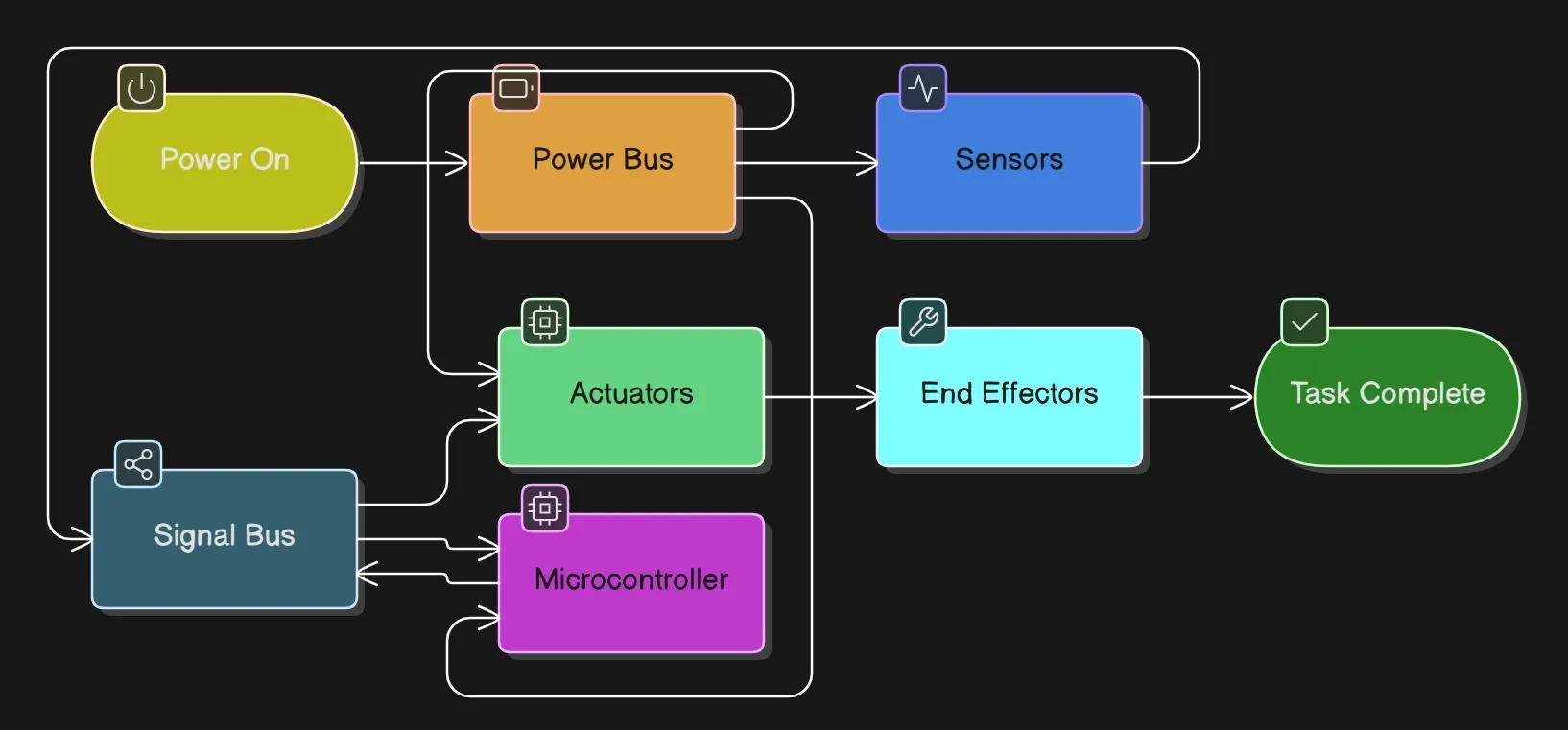
This is the typical workflow of a robot:- Environment—(information extracted)—>Sensors——>Microcontroller——>Actuators——>End-effectors
Power supply: Pretty self-explanatory. Every electronic device requires power to function. If a robot is stationary, we might power it through our mains supply. But as most robots are mobile, we require portable power sources, which is where batteries come in.
Here is an overview of the kinds of batteries.
When your projects start, you will very quickly become familiar with Li-Po batteries. They are lightweight, high-energy, rechargeable and offer a steady power-supply,so we use them frequently in mobile robots, drones, etc. But they require careful handling, as they can cause quite the bang if not used correctly(:P)
Bus: In the world of computer networks(and electronics in general) ,a bus is a shared communication pathway that helps transmit signals between sender and receiver. There are different types of signals, and hence different buses are required to transmit different kinds of signals. Your phone charging cable would typically have both buses present(hence it can both charge your phone as well as share Internet connectivity with your PC through USB tethering).
Microcontroller: The microcontroller is the “brain” of any robot. It stores the program(or set of instructions to be executed) and the data on which the instructions would act. It also connects together all the other components(like sensors and actuators),times the task execution through its clocks and enables communication with other devices outside the robot
There are multiple kinds of microcontrollers available today, with a variety of memory sizes and additional features to provide a multitude of functionalities. The most popular microcontroller for basic applications is the Arduino range of microcontrollers. Why Arduino? Because it is extremely easy and intuitive to learn and operate, has a large number of peripherals, shields and ports that enable us to use a variety of additional modules including cameras like a plug-and-play system, and has codes and programs for the most widely used applications already in-built. So, what is Arduino?
Like any other microcontroller, Arduino microcontrollers also require us to write computer programs to upload on the device. Even if you are clueless about programming right now, don’t sweat it because-i)programming on Arduino is extremely easy, and; ii)there will be hands-on sessions and guidance too :) . To give a basic overview, programming for Arduino is done in the Arduino IDE, a specialized environment created by the developers of these boards in order to facilitate quick programming and debugging. The syntax used here has some quirks of its own, but it is largely based on C++, so it is very easy to learn and code in.
You don’t need to finish this video at once(keep referring to it if you get stuck or just want to revise)
There is another extremely popular microcontroller ecosystem along with Arduino-the ESP family. ESP is an upgrade over Arduino in many ways: faster processing, more memory, in-built Wi-Fi and Bluetooth modules for real-time IoT applications(and it is compatible with the Arduino IDE :D ). Arduino is the best for beginners, but certain applications require ESP controllers.
Sensors: Sensors are devices that capture information from the environment and convert it into actionable inputs for the microcontroller. Think of our sensory organs. Just like we act based on what we sense in the environment, a microcontroller requires inputs from sensors to make decisions accordingly. You will find a lot of different sensors in the lab, most of them are covered here .
Actuators: Actuators are the ‘doers’ in a robot.They are responsible for converting inputs from the microcontroller into physical action.All physical motion in a robot is generated through actuators.Think of them as our body’s muscles. The following articles would help you understand the types of actuators and the different applications of each. (https://www.wevolver.com/article/robotic-actuators-the-muscle-power-of-industry-40 https://robocraze.com/blogs/post/types-of-motors-used-in-robotics?srsltid=AfmBOops5a11hKZdom014LfxLLiEgn_dsSZ6nqFD_uL7FO5YcjsJgcQD https://www.linkedin.com/pulse/how-choose-most-appropriate-motors-industries-robotics-automation/)
End-effectors: End-effectors are specialized devices that interact with the environment on the basis of the movements of the actuator. The fingers of our hand are a close equivalent of end-effectors. (https://standardbots.com/blog/what-is-an-end-effector-and-how-do-they-work)
The basic you need to know
Math and physics are fundamental to all engineering disciplines, regardless of the specific branch or domain you are interested in. The basics of mechanics, such as force, rotational motion, and torque are required to be able to build properly functioning robots. So is an understanding of linear algebra. Robotic motion is governed by fundamental rules of linear algebra, and it is important to have an intuitive understanding of the mathematics if one wishes to accurately model robot movement and motion. The following concepts show up regularly:-
- Vectors represent positions, directions, and velocities. A point in a frame is just a vector from that frame's origin.
- Matrices represent transformations : rotating, scaling, or moving vectors into a different frame. A 3×3 rotation matrix rotates a vector for example.
- Transformation matrices (homogeneous coordinates): In robotics, we almost always packages rotation and translation together into a single 4×4 matrix, so that we can chain frame conversions with plain matrix multiplication instead of juggling rotation and translation separately. Understanding transformation matrices is important to understand forward/inverse kinematics.
- Dot and cross products show up constantly: dot product is used for projecting/measuring alignment (how much is this force along this direction), while cross product is used for anything involving rotation axes or torque.
Degrees and Frames
Every robot exists somewhere, facing some direction. Degrees of freedom (DOF) is just a count of the independent ways it can move: each translation along an axis (x, y, z) and each rotation around an axis (roll, pitch, yaw) is one DOF. A free rigid body in 3D space has 6 DOF total for example. Practical robots rarely have a full 6 DoF, joints constrain motion but are required to provide mobility and flexibiity (a hinge only lets you rotate around one axis for example), so the actual DOF of a robot is whatever remains after you subtract out what the joints restrict. This is formalized as Grübler's formula.
F = 3(N - 1) - 2J, where:
- F = Degrees of Freedom (DoF)
- N = Total number of links (including fixed ground link)
- J = Number of joints connecting the links
As you might have studied in motion, location and motion are not absolute, they become physically meaningful only when described relative to a frame of reference. Robot location can be described only in relation to a fixed reference point to measure from which is called a coordinate frame: an origin plus three perpendicular axes (x, y, z), oriented by the right-hand rule. A robot typically juggles several frames at once : a world frame (fixed, describes the whole environment), a base frame (attached to the robot's body), and often an end-effector frame (attached to the end-effector). Robot kinematics then becomes all about how to transform co-ordinates from one frame to another to execute tasks.
Resources
- https://www.3blue1brown.com/?topic=linear-algebra (for understanding of linear algebra)